
The "Heat Now" Feature
We're rolling out the new Heat Now feature, which will allow you to heat your water outside your normal geyser heating schedule. Get hot water when you need it! Did you forget to adjust your schedule around load shedding, or did unexpected visitors use more hot water than you planned for? Simply use Heat Now to start heating your geyser without any hassle.How to use it?
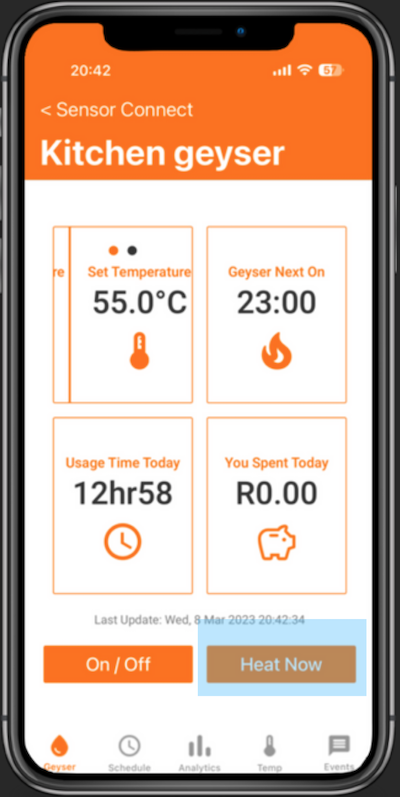
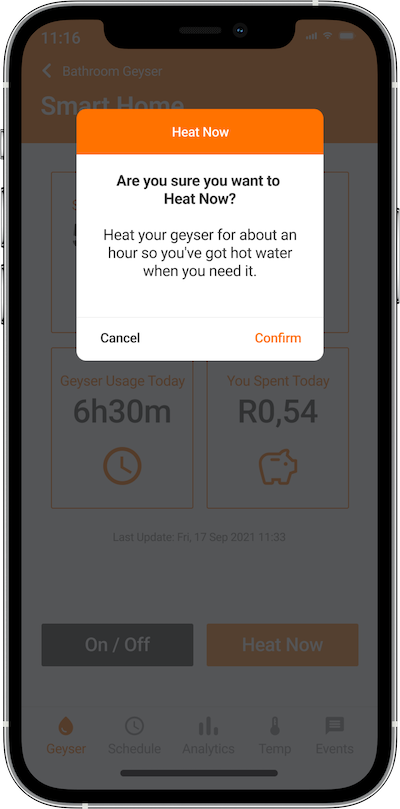
To use this feature, your Geyser Connect must be updated to the latest firmware (you'll see the Heat Now button when your Geyser Connect is ready). Once it is available to you, simply select your geyser from your Device List and click on the Heat Now button at the bottom of the Geyser Home Screen.After you have confirmed activation of Heat Now, your geyser will begin heating (regardless of your heating schedule) and you'll see the status change to "Heating now...". When "Heat Now" is active, your geyser will continue heating for the next hour or so. At this stage, you can press Heat Now again if you need to heat the water for longer.
Now you can enjoy hot water anytime you need it, without any hassle. Did you forget to adjust your schedule around load shedding, or did unexpected visitors use more hot water than you planned for? Simply use Heat Now to start heating your geyser without any hassle.
© Copyright 2023 Sensor Networks. All rights reserved.