
Why is my hot water temperature different from what I see in the Sensor Connect app?
The primary function of any household geyser is to heat water. Therefore, it is reasonable to expect that when you open your hot-water tap, hot water is what comes out. What you may not realise, however, is that there are a whole range of factors that determine the temperature of the water your geyser “thinks” it is versus what actually flows out the tap and into your sink or shower.This article serves to explain why the temperature of the water coming out your taps might be different from what you see in the Sensor Connect app.
How does a geyser work?
Firstly, it’s important to understand how a standard electric geyser works. All geysers are unique in that they may be piped and positioned slightly differently in each household. Your geyser may be up in the ceiling crawl space, tucked away in a cupboard, or connected to the wall in a garage, for example.Generally, however, cold water from your municipal supply enters the geyser from the bottom, and the geyser element – the part that receives electrical power to actually heat up the water – is usually positioned nearby.
Secondly, a device inside the geyser (such as the Geyser Connect internal temperature sensor) measures the temperature of the water around it, and tells the element to turn on (heat up the water) or turn off (stop heating). The sensor can only measure the water immediately surrounding it – remember that your geyser may contain as much as 150, 200 or 250 litres of water – and hot water rises, so the hot-water exit pipe for the geyser is normally located near to the top; this is the water that ends up coming out of your hot-water taps.
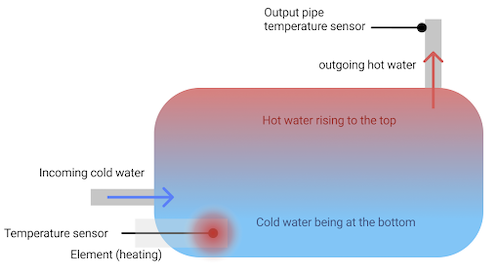
As you draw hot water from your household taps, cold water rushes into the geyser at the bottom to refill it. So, most of the time, the water inside your geyser is not a unified temperature. See the following diagram:
Why don't we just position the temperature sensor at the top?
The Sensor Networks temperature sensor is placed at the bottom of the geyser near the incoming cold water supply. This is where a standard geyser thermostat is placed, as this tells the geyser that there is cold water entering the geyser, and that the element needs to turn on to heat it up. If the temperature sensor was at the top, it would think the water is hot (over 50°C), and not heat up your water, even though cold water has just entered the system.By positioning the temperature sensor at the bottom (essentially replacing the geyser’s original mechanical thermostat), we know that if the temperature reading there matches your chosen set-point temperature (normally 50–55°C), then the geyser has been heated up sufficiently to assume it is full of hot water. If the temperature is lower, then cold water has recently entered the system, or the water in the geyser is not sufficiently hot.
See the following diagram:

What should I do when the temperature showing in the app is lower than the desired set-point temperature?
If someone in the household just used hot water, you should do nothing. Give the cold water that has just entered the geyser time to mix with the hot water at the top; allow the temperatures to stabalise so you can see the true temperature of the water inside the geyser. You won’t feel an immediate drop in the temperature of the water coming out your taps if you have only used a little water. This is not true, however, if several people have taken a shower, or if you have drawn a very deep bath; this would mean a lot of cold water has entered the system.Luckily, you have a geyser heating schedule in the Sensor Connect app, which you can use to turn the geyser on before you normally use hot water – remember that it takes a bit of time for 200 litres of water to heat up, so allow for a hour or more if you’ve used a lot of hot water. Alternatively, if you used hot water outside your normal household pattern, or you recently experienced some badly-timed load shedding, then simply use the Heat Now feature in the Sensor Connect app.
Need Help?
For any assistance with the Sensor Connect app, please contact Sensor Connect product support:Tel: 021 201 1168
Whatsapp: 066 485 7148
Email: support@sensorconnect.co
Website: sensor.energy
© Copyright 2025 Sensor Networks. All rights reserved.